

What do your SAP system refreshes really cost per year?
Nothing to be installed in your SAP systems!You can start immediately - in all your SAP systems with an ABAP stack.Also in S/4HANA systems.Get a free trial license and discover the possibilities!A single license is enough for the whole SAP landscape.
Copying the database takes hours. Rebuilding the target system afterwards often takes days. Here is what that costs, and why automating the pre- and post-work pays for itself with the first refresh.
Every SAP landscape needs fresh test data. Without regular refreshes of QA and test systems, testing drifts away from reality, and the defects show up in production.
The database copy itself is rarely the problem. Storage snapshots, backup and restore or a HANA system copy are well understood and fast.
The problem is everything around it.
What a manual refresh really involves
Before the copy, the Basis team has to secure everything that makes the target system the target system. After the copy, all of it has to come back. In practice, that means:
- RFC destinations, ALE distribution model and partner profiles
- SAPconnect configuration
- Logical file paths
- Logon and server groups
- Licence key, client settings, system changeability
- Web services, transport management, content repositories, external OS commands
- System users, test users and project team users, with their passwords and roles
- and many many more!
Done manually, this means screenshots, table downloads, Transport of Copies, checklists and a lot of careful typing, often over a weekend, because testers need the system back on Monday.
Our estimate: around 40 hours of pre- and post-work per refresh. Your team may be faster. The point of this article is not the exact number, but what happens to the total once you multiply it.
The calculation
Take a typical mid-sized landscape:
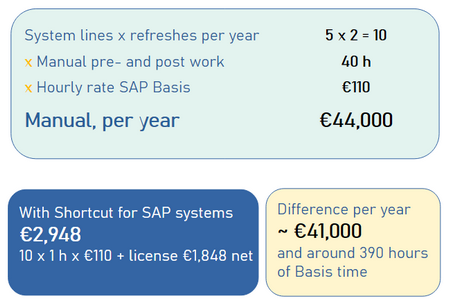
- 5 system lines, each refreshed twice a year: 10 refreshes
- 40 hours of manual pre- and post-work per refresh
- €110 per hour for SAP Basis, internal or external
With Shortcut for SAP Systems, the same work is reduced to around one hour per refresh: preparing the run and checking the result.
Automated: 10 × 1 h × €110 = €1,100, plus the licence at €1,848 net = €2,948 a year.
The difference is around €41,000 and roughly 390 hours of Basis capacity a year.
It pays for itself with the first refresh
One manual refresh at 40 hours costs €4,400. The licence costs €1,848 a year net. In this example, the licence has paid for itself before with the very first system refresh.
And if your team needs far less time? Even at only 20 hours per refresh, the licence pays for itself with the very first system refresh.
And if your team needs far less time? Even at only 20 hours per refresh, the licence pays for itself with the very first system refresh.
Two costs are not included above, because they vary too much: weekend and on-call surcharges, and the time testers and project teams spend waiting for their system.
Better quality: the same result every time
Money is the easiest argument to put in a spreadsheet. For many Basis teams, quality matters more.
A manual refresh depends on the person doing it and on the checklist they use. Miss one RFC destination, and the test system talks to production. Forget to suspend jobs, and they run twice. Lose the test users, and the project team cannot log on. And there are many more traps.
An automated refresh follows the same task list every time:
- User locking, suspending batch jobs etc. is integrated into the automatism.
- System-specific data is exported before the copy and restored afterwards, from the data itself, not from screenshots.
- Nothing depends on someone remembering step 37 of a checklist at 2 a.m.
Users can be preserved selectively: test users, project team members and system users stay, without a temporary client and without choosing between all source or all target users.
The result is a target system that looks the way it should, refresh after refresh.
Relief for the Basis team
Basis teams are rarely overstaffed. Every refresh weekend is time not spent on upgrades, S/4HANA projects, security or performance. Automating the pre- and post-work gives that time back. In the example above, that is around 390 hours a year, roughly ten working weeks.
Because Shortcut for SAP Systems includes a command-line tool, the steps can also run as part of your existing refresh workflow, for example overnight. The knowledge no longer lives in one person's head or one Excel checklist.
Faster back in use
Downtime of a QA system is not free either. While the system is being rebuilt, testing, training and development stop.
Shortcut for SAP systems exports and imports the system-specific tables with SAP's own R3trans, in parallel. Combined with an automated, scripted run, the target system is back in use much sooner than after a manual rebuild that waits for working hours and for the one colleague who knows the steps.
Why this matters now: the end of SAP LaMa
Many landscapes automate this work today with SAP Landscape Management Enterprise and its Post Copy Automation. SAP LaMa 3.0 reaches end of maintenance on 31 December 2027 (SAP Note 3375877), and SAP has not announced a successor.
That makes 2027 the year to decide where pre- and post-work will run in future. Going back to manual work is the most expensive option, as the calculation shows.
A note on licensing: LaMa Enterprise is licensed per managed system. Shortcut for SAP Systems is licensed per user. One licence covers any number of SAP systems and any number of system refreshes, so the cost does not grow with your landscape.
What Shortcut for SAP Systems does, and what it does not
To keep the comparison fair:
- It does handle the steps before and after the copy: saving system-specific data, cleaning up and restoring the system-specific data. Furthermore, it manages the locking/unlocking of users, the deactivation/activation of batch jobs, the execution of BDLS, etc.
- It does not copy the database. That stays with your database or storage tools.
- It does not need an installation in your SAP systems. No add-on, no transport. It connects via the SAP Java Connector and works with all ABAP-based systems, including S/4HANA.
Check it with your own numbers
Every landscape is different. The fairest test is your own calculation:
- Count your refreshes per year.
- Estimate the hours of pre- and post-work per refresh.
- Multiply by your hourly rate and compare with the sum of €1,848 net a year for "Shortcut for SAP systems - Data Admin" plus 1 hour work per system refresh.
And of course you are welcome to test our product with a free trial licence on one of your next refreshes.
Let us show you how easy and fast it is in a personal and individual session - live on the system!