

Using an own Java Runtime Environment for Shortcut for SAP systems
In case you run into problems related to the Java Runtime Environment (JRE), for example on computers where you do not have administrator authorizations, there is a workaround: you can use an own JRE, dedicated for the use of "Shortcut for SAP systems". This can be done without administrator authorizations. You only need Internet access for downloading a JRE.
The JRE necessary for the execution of "Shortcut for SAP systems" needs to have JavaFX.
JavaFX is a library for Java desktop applications. Depending on the JRE, it may or may not be part of the JRE installation. It can be added to an already existing JRE, but for using an own JRE for "Shortcut for SAP systems" it is much easier to use a JRE with JavaFX already included.
JavaFX is a library for Java desktop applications. Depending on the JRE, it may or may not be part of the JRE installation. It can be added to an already existing JRE, but for using an own JRE for "Shortcut for SAP systems" it is much easier to use a JRE with JavaFX already included.
These 2 JRE's (maybe there are more) contain JavaFX. Like most JRE's, they can be downloaded and used for free.
- Bellsoft Liberica JDK: https://bell-sw.com/pages/downloads/ (choose a "Full" package)
- Azul ZuluFX: https://www.azul.com/downloads/?package=jdk-fx (choose an "FX" package)
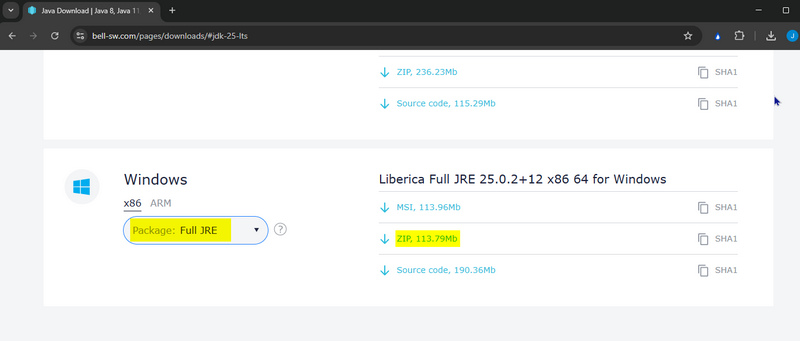
For using the Bellsoft Liberica JDK we have to take a "Full JDK" or "Full JRE", because JavaFX is not part of the other bundles. The "JDK" is for using it for development, we can take the smaller "JRE" for the runtime environment only. And we choose the ZIP file, because it can be used easily without needing any authorizations on our computer as we would need it for the "MSI" file.
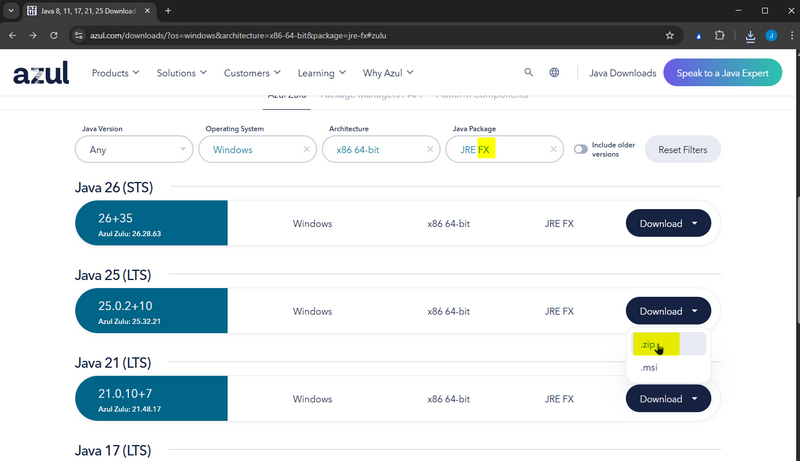
Using the Azul ZuluFX JRE is very similar. We do not need to develop, so the JRE bundle with JavaFX is sufficient:
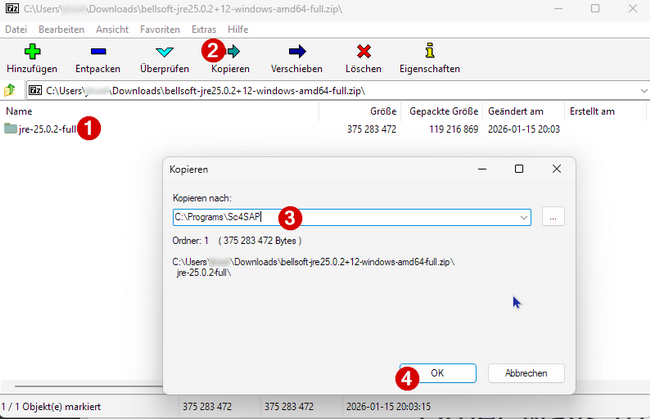
After downloading the file we can open it (e.g. with 7-zip) and copy the directory containing the Java JRE and JavaFX into the directory of "Shortcut for SAP systems":
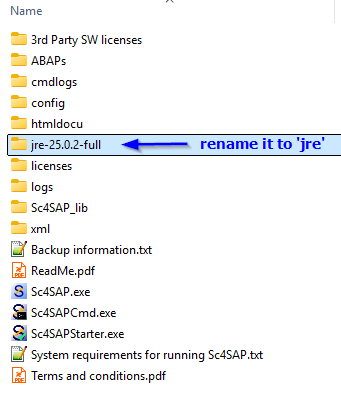
Last step: rename the directory to 'jre'.
And that's all! With that the requirements regarding Java and JavaFX are fulfilled.